User Manual
NMRflux.jl provides a unified framework for NMR data processing, simulation, and machine learning based spectral cleaning. It combines vendor neutral file loading, classical processing tools, spin dynamics simulation modules, and Flux based ML models for automated denoising. This manual gives a practical introduction to the core functionality of the package.
1. Installation
To install the package from GitHub:
import Pkg
Pkg.add(url = "https://github.com/marcel-utz/NMRflux.jl.git")
Once installation is complete:
using NMRflux2. Loading NMR Data
NMRflux.jl provides: Low level, vendor specific readers in the submodule NMRflux.FileIO. These work directly with Bruker and JEOL file formats and return raw time domain arrays and parameter dictionaries. High level processing tools that operate on SpectData objects created from these raw arrays. For convenience, NMRflux.jl comes with example datasets that can be used in the documentation and in interactive sessions.
2.1 Example datasets
The example data are stored in the dictionary NMRflux.Examples.Data.
using NMRflux
using NMRflux.Examples

data_bruker = NMRflux.Examples.Data["HCC cell culture media spectra"]
Dict{String, Any} with 9 entries:
"name" => "HCC cell culture media spectra"
"format" => "Bruker"
"author" => "Evie Rogers"
"files" => ["/Users/mu3q/Dropbox/Source/NMRflux.jl/src/../examples/2023…
"reference" => "unpublished"
"doi" => ""
"tags" => ["microfluidic NMR", "cells", "metabolomics"]
"description" => "^1H NMR experiments obtained from the supernatant of HCC ce…
"path" => "/Users/mu3q/Dropbox/Source/NMRflux.jl/src/../examples/2023-…using NMRflux
using NMRflux.Examples
data_joel = NMRflux.Examples.Data["Spheroid culture medium"]Dict{String, Any} with 9 entries:
"name" => "Spheroid culture medium"
"format" => "JEOL"
"author" => "Yaping Li, KIT"
"files" => ["/Users/mu3q/Dropbox/Source/NMRflux.jl/src/../examples/2025…
"reference" => "unpublished"
"doi" => ""
"tags" => ["microfluidic NMR", "cells", "metabolomics"]
"description" => "Initial experiments with culture of MCF-7 cells in the Utz\…
"path" => "/Users/mu3q/Dropbox/Source/NMRflux.jl/src/../examples/2025-…2.2 Bruker Data High-level (recommended)
For most use cases, Bruker data can be loaded via the high-level load function, which returns both the acquisition parameters and a time domain SpectData object:
data_bruker = NMRflux.Examples.Data["HCC cell culture media spectra"]
params_bruker, data_td_bruker = NMRflux.load(joinpath(data_bruker["path"], "10"), :Bruker)

(params_bruker["SW_h"], size(data_td_bruker))
(13888.8888888889, (32693,))Here:
params_brukeris a dictionary of acquisition parameters parsed fromacqus.data_td_brukeris aSpectDataobject containing the time domain FID with an appropriate time axis.
Internally, NMRflux.load(path, :Bruker):
- Reads acqus and fid using
NMRflux.FileIO - Applies the Bruker group-delay correction using the parameter
GRPDLY - Constructs the time axis from the sweep width
SW_h.
This saves users from manually computing the dwell time and axis. The loaded FID can be inspected as:
using Plots: plot, savefig

t = data_td_bruker.coord[1]
y = real.(data_td_bruker.dat)

plot(t, y, xlabel = "time / s", ylabel = "signal (a.u.)", title  = "Bruker FID (real part) - High level loading") # Plot the real part of the FID
savefig("bruker_fid_hl_plot.svg"); nothing # Save figure for Documenter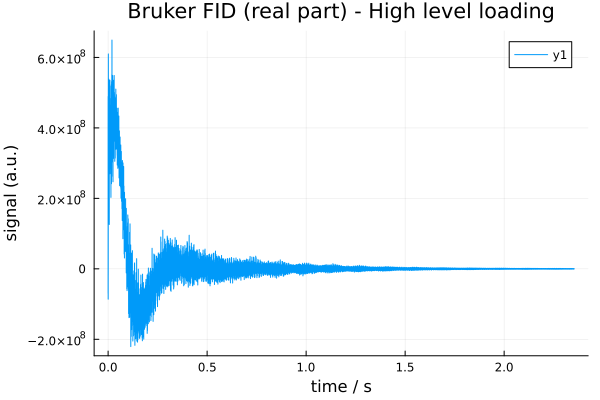
2.3 Bruker Data (Low-level FileIO)
Power users can work with the low-level Bruker readers in NMRflux.FileIO. These functions operate directly on the raw Bruker files (fid, acqus, etc.) and return:
- A complex FID as a Julia vector
- A dictionary of acquisition parameters
Using the same example dataset as above, we can read the FID as follows:
using NMRflux.FileIO

fid_bruker = NMRflux.FileIO.readBrukerFID(joinpath(data_bruker["path"], "10", "fid"))
32768-element Vector{ComplexF64}:
131.203125 - 181.21875im
-496.359375 + 908.015625im
431.1171875 - 274.828125im
-706.625 + 1392.2265625im
1086.328125 - 1282.7421875im
-1474.546875 + 2338.7421875im
2038.015625 - 2740.5im
-2732.1015625 + 4055.1171875im
3593.5078125 - 5045.671875im
-4740.96875 + 6741.3984375im
⋮
-283007.765625 - 183694.90625im
-420138.875 + 79240.765625im
-175130.375 + 254453.578125im
-25309.578125 + 487678.984375im
0.0 + 0.0im
0.0 + 0.0im
0.0 + 0.0im
0.0 + 0.0im
0.0 + 0.0imThe fid_bruker is a Vector{ComplexF64} containing the complex time domain data points stored in the Bruker fid file. For older TopSpin 2.0 data, the FID is stored as 32-bit integers; in that case you can specify the format:
#fid_bruker_old = NMRflux.FileIO.readBrukerFID("fid"; format = Int32) # Example call for TopSpin 2.0 data
nothing
The acquisition parameters are stored in Bruker JCAMP-DX files such as acqus. We can read them using:
params_bruker = NMRflux.FileIO.readBrukerParameterFile(joinpath(data_bruker["path"], "10", "acqus"))Dict{String, Any} with 235 entries:
"O4" => 4323.3
"PCPD" => [0, 80, 0, 0, 0, 0, 0, 0, 0, 0]
"PLWMAX" => Real[137.28, 0, 0, 0, 0, 0, 0, 0]
"PQSCALE" => 1
"TE" => 298.0
"FQ5LIST" => "<>"
"RECPRE" => [-1, 0, -1, -1, -1, -1, -1, -1, -1, -1 … -1, -1, -1, -1, -1, …
"VPLIST" => "<>"
"VCLIST" => "<>"
"O7" => 4323.3
"FL3" => 0
"FQ6LIST" => "<>"
"SW_h" => 13888.9
"DATATYPE" => "Parameter Values"
"RSEL" => [0, 1, 0, 0, 0, 0, 0, 0, 0, 0 … 0, 0, 0, 0, 0, 0, 0, 0, 0, 0]
"CNST" => [1, 1, 1, 1, 1, 1, 1, 1, 1, 1 … 1, 1, 1, 1, 1, 1, 1, 1, 1, 1]
"USERA4" => "<>"
"YMAX_a" => 6.494e8
"SPOFFS" => [0, 0, 0, 0, 0, 0, 0, 0, 0, 0 … 0, 0, 0, 0, 0, 0, 0, 0, 0, 0]
⋮ => ⋮The params_bruker is a Dict{String,Any} in which:
- Numeric scalar values are automatically parsed as
Int64orFloat64 - Non-numeric scalars remain as
String - Array parameters (such as
D0,D1, etc) are returned as Julia vectors whose elements
are parsed in the same way (integer, float, or string)
Bruker array parameters such as D0, D1, etc are stored in a single vector params_bruker["D"]. Because Julia arrays are 1-based, D0 corresponds to index 1, D1 to index 2, and so on:
(params_bruker["D"][1], params_bruker["D"][2]) # D0, D1(0, 5)An important example is the sweep width in Hz, stored in the parameter SW_h. The dwell time (sampling interval) is its inverse, and can be used to construct a time axis:
dwell     = 1 / params_bruker["SW_h"]                  # s per point
time_axis = (0:length(fid_bruker)-1) .* dwell          # explicit time vector
(dwell, length(time_axis))
(7.199999999999995e-5, 32768)The same example can be used to quickly inspect the loaded FID:
plot(time_axis, real(fid_bruker), xlabel = "time / s", ylabel = "signal (a.u.)", title  = "Bruker FID (real part) - Low level loading") # Plot the real part of the FID
savefig("bruker_fid_plot.svg"); nothing # Save figure for Documenter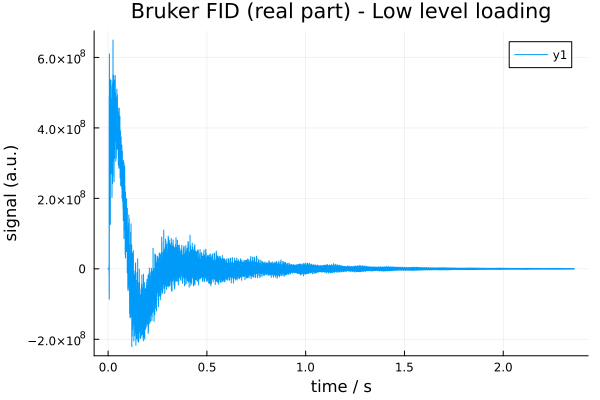
With the FID and time axis defined, a time domain SpectData object can be constructed as:
data_td_bruker = SpectData(fid_bruker, (time_axis,))32768-element SpectData{ComplexF64, 1} with coords:(0.0:7.199999999999995e-5:2.3592239999999984,):
131.203125 - 181.21875im
-496.359375 + 908.015625im
431.1171875 - 274.828125im
-706.625 + 1392.2265625im
1086.328125 - 1282.7421875im
-1474.546875 + 2338.7421875im
2038.015625 - 2740.5im
-2732.1015625 + 4055.1171875im
3593.5078125 - 5045.671875im
-4740.96875 + 6741.3984375im
⋮
-283007.765625 - 183694.90625im
-420138.875 + 79240.765625im
-175130.375 + 254453.578125im
-25309.578125 + 487678.984375im
0.0 + 0.0im
0.0 + 0.0im
0.0 + 0.0im
0.0 + 0.0im
0.0 + 0.0im2.4 JEOL Data High-level loading (recommended)
JEOL .jdf files contain acquisition parameters and binary data in a single file. JEOL datasets can be loaded using the unified high level loader NMRflux.load, which returns both the acquisition parameters and a time domain SpectData object. Most users can load JEOL data using:
using Plots

data_jeol = NMRflux.Examples.Data["Spheroid culture medium"]
jdf_file  = joinpath(data_jeol["path"], "yp-5-fu-2.5-100.jdf")

params_jeol, data_td_jeol = NMRflux.load(jdf_file, :JEOL)

t_jeol = data_td_jeol.coord[1]    # time axis (s)
y_jeol = real.(data_td_jeol.dat)  # real part

plot(t_jeol, y_jeol;
xlabel = "time / s",
ylabel = "signal (a.u.)",
title = "JEOL FID (real part)")

savefig("jeol_fid_plot.svg"); nothing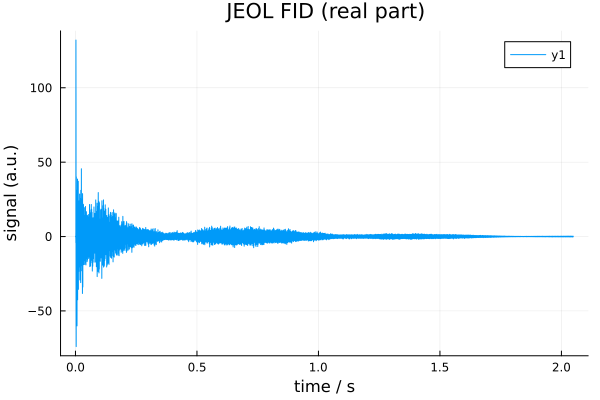
The returned values are:
params_jeol::Dict{String,Any}. A dictionary of JEOL acquisition parameters where each entry is stored as a tuple (scaler, units, value)data_td_jeol::SpectData{ComplexF64,1}(orSpectData{ComplexF32,1}depending on the file). ASpectDataobject containing the reconstructed complex FID and its time axis
The high level loader performs all low level steps automatically:
- Reads the JEOL header and parameter blocks
- Reconstructs complex time domain data from the stored real/imaginary vectors
- Constructs the correct time axis from the digitization rate in
X_SWEEP - Returns a ready-to-use
SpectDatafor downstream processing
params_jeol, data_td_jeol = NMRflux.load(jdf_file, :JEOL)
(size(data_td_jeol), params_jeol["X_SWEEP"][3])
((23072,), 11261.261261261263)2.5 JEOL data (low-level FileIO)
For advanced use, the low-level JEOL reader in NMRflux.FileIO provides direct access to all parts of the .jdf file:
header_jeol, params_jeol, data_jeol = NMRflux.FileIO.readJEOL(open(jdf_file))(Dict{String, Any}("listLength" => UInt32[0x00000000, 0x00000000, 0x00000000, 0x00000000, 0x00000000, 0x00000000, 0x00000000, 0x00000000], "baseFreq" => [600.17230460376, 0.0, 0.0, 0.0, 0.0, 0.0, 0.0, 0.0], "author" => "datum", "annotateLength" => 0x00000000, "contextLength" => 0x00006220, "dataAxisStop" => [2.0485271999999997, 0.0, 0.0, 0.0, 0.0, 0.0, 0.0, 0.0], "instrument" => "ECA", "dataPoints" => Int32[23072, 1, 1, 1, 1, 1, 1, 1], "totalSize" => 0x0000000000065440, "annotationOk" => true…), Dict{String, Any}("wgh_grad_2_amp" => (0, Tuple{String, String, Int8}[("Milli", "Tesla", 1), ("", "Meter", 15), ("", "None", 0), ("", "None", 0), ("", "None", 0)], 60.0), "sawtooth_range" => (0, Tuple{String, String, Int8}[("", "None", 0), ("", "None", 0), ("", "None", 0), ("", "None", 0), ("", "None", 0)], 4.0), "wgh_x_pulse" => (0, Tuple{String, String, Int8}[("Micro", "Second", 1), ("", "None", 0), ("", "None", 0), ("", "None", 0), ("", "None", 0)], 5.01804), "phase_6" => (0, Tuple{String, String, Int8}[("", "None", 0), ("", "None", 0), ("", "None", 0), ("", "None", 0), ("", "None", 0)], 180.0), "lowIndex" => 0x00000000, "changer_slot_position" => (0, Tuple{String, String, Int8}[("", "None", 0), ("", "None", 0), ("", "None", 0), ("", "None", 0), ("", "None", 0)], 0.0), "get_value_of_field" => (0, Tuple{String, String, Int8}[("", "None", 0), ("", "None", 0), ("", "None", 0), ("", "None", 0), ("", "None", 0)], "pulse_service::g"), "TOTAL_SCANS" => (0, Tuple{String, String, Int8}[("", "None", 0), ("", "None", 0), ("", "None", 0), ("", "None", 0), ("", "None", 0)], 64), "spin_status" => (0, Tuple{String, String, Int8}[("", "None", 0), ("", "None", 0), ("", "None", 0), ("", "None", 0), ("", "None", 0)], "SPIN ON "), "shim_x3z3" => (0, Tuple{String, String, Int8}[("", "Hertz", 1), ("", "None", 0), ("", "None", 0), ("", "None", 0), ("", "None", 0)], 47.300000000000004)…), [-2.1497944882665717e-7, -0.00013950422110987898, -0.0051844162649977935, -0.08807038729465194, -0.08907652978845076, -0.06816492160840142, -0.1196864118719773, 0.02066485740608047, -0.20010019956661748, 0.1504551844350158 … -0.24293406484935914, -0.06486871065502277, 0.1211813507594912, 0.20009470546198344, 0.27849253911458305, 0.14715037202527512, -0.012573650929477098, -0.15815274425485404, 0.0, 0.0])This function returns:
header_jeol: a dictionary with file-level metadata (axes, units, base frequencies, etc.)params_jeol: a dictionary of JEOL acquisition parameters where each entry is a (scaler, units, value) tupledata_jeol: a 1-D vector ofVector{Float32}orVector{Float64}containing the stored data (real part followed by imaginary part) with the layout:
[ Re1, Re2, Re3, ..., ReN, Im1, Im2, Im3, ..., ImN ]Some of the metadata fields available in the JEOL header include:
# header_jeol["dataAxisStart"]
# header_jeol["dataAxisStop"]
# header_jeol["dataPoints"]
# header_jeol["baseFreq"]
header_jeol["zeroPoint"]
8-element Vector{Float64}:
0.2485325519999998
0.0
0.0
0.0
0.0
0.0
0.0
0.02.6 Reconstructing complex FID data
To reconstruct complex FID values, we split this vector into real and imaginary halves and combine them:
n     = length(data_jeol)
cdata = data_jeol[1:n>>1] - im * data_jeol[n>>1+1:end]
23072-element Vector{ComplexF64}:
-2.1497944882665717e-7 - 7.707002455031156e-6im
-0.00013950422110987898 - 0.00017234635428217768im
-0.0051844162649977935 - 0.05157299135423599im
-0.08807038729465194 - 0.21358801463142338im
-0.08907652978845076 + 0.1320968426880609im
-0.06816492160840142 - 0.2336285920028921im
-0.1196864118719773 + 0.25899468673315246im
0.02066485740608047 - 0.14237400938472022im
-0.20010019956661748 + 0.028457352931816903im
0.1504551844350158 + 0.4376629340060086im
⋮
0.2219324698160381 + 0.06486871065502277im
0.24239250519559702 - 0.1211813507594912im
0.0970754939400109 - 0.20009470546198344im
-0.08721091449889644 - 0.27849253911458305im
-0.1619749954867644 - 0.14715037202527512im
-0.15511019557983385 + 0.012573650929477098im
-0.1740184893274526 + 0.15815274425485404im
0.0 - 0.0im
0.0 - 0.0imThe cdata is now a complex vector containing the time domain JEOL FID.
2.7 Constructing a time axis
JEOL digitization information is stored in the X_SWEEP parameter. The sweep width is typically in the third element:
dwell     = 1.0 / params_jeol["X_SWEEP"][3]
time_axis = range(0.0, step = dwell, length = length(cdata))0.0:8.879999999999999e-5:2.04870482.8 Constructing a SpectData object
data_td_jeol = SpectData(cdata, (time_axis,))23072-element SpectData{ComplexF64, 1} with coords:(0.0:8.879999999999999e-5:2.0487048,):
-2.1497944882665717e-7 - 7.707002455031156e-6im
-0.00013950422110987898 - 0.00017234635428217768im
-0.0051844162649977935 - 0.05157299135423599im
-0.08807038729465194 - 0.21358801463142338im
-0.08907652978845076 + 0.1320968426880609im
-0.06816492160840142 - 0.2336285920028921im
-0.1196864118719773 + 0.25899468673315246im
0.02066485740608047 - 0.14237400938472022im
-0.20010019956661748 + 0.028457352931816903im
0.1504551844350158 + 0.4376629340060086im
⋮
0.2219324698160381 + 0.06486871065502277im
0.24239250519559702 - 0.1211813507594912im
0.0970754939400109 - 0.20009470546198344im
-0.08721091449889644 - 0.27849253911458305im
-0.1619749954867644 - 0.14715037202527512im
-0.15511019557983385 + 0.012573650929477098im
-0.1740184893274526 + 0.15815274425485404im
0.0 - 0.0im
0.0 - 0.0imThe acquisition parameters (params_jeol) and header information (header_jeol) may be stored alongside the SpectData object to keep all metadata available for processing.
3. Working with SpectData
SpectData is the central data structure in NMRflux.jl. It stores an N-dimensional numerical data array, and one coordinate vector for each dimension, and is defined as a subtype of AbstractArray{T,N}. This means that SpectData behaves like a regular Julia array in most contexts: it supports indexing, slicing, broadcasting, and can be passed to most numerical functions that expect an array.
For reference, the type is defined as:
struct SpectData{T,N} <: AbstractArray{T,N}
dat::AbstractArray{T,N}
coord::NTuple{N,AbstractVector}
end
Using the JEOL time-domain data from above:
data_td_jeol
size(data_td_jeol)(23072,)3.1 Basic indexing
SpectData can be indexed just like a normal array. When you index with a range, you obtain a SpectData view with the corresponding subset of the data and coordinates:
data_td_jeol[1:5] # SpectData containing the first 5 complex points5-element SpectData{ComplexF64, 1} with coords:(0.0:8.879999999999999e-5:0.00035519999999999996,):
-2.1497944882665717e-7 - 7.707002455031156e-6im
-0.00013950422110987898 - 0.00017234635428217768im
-0.0051844162649977935 - 0.05157299135423599im
-0.08807038729465194 - 0.21358801463142338im
-0.08907652978845076 + 0.1320968426880609imTo access the underlying numerical values directly, you can use the dat field or broadcasted operations:
data_td_jeol.dat[1:5]     # first 5 complex values as a plain array
real.(data_td_jeol)[1:5]  # real part of first 5 points
imag.(data_td_jeol)[1:5]  # imaginary part of first 5 points
5-element SpectData{Float64, 1} with coords:(0.0:8.879999999999999e-5:0.00035519999999999996,):
-7.707002455031156e-6
-0.00017234635428217768
-0.05157299135423599
-0.21358801463142338
0.1320968426880609Multi dimensional SpectData objects behave analogously, with size and indexing following standard Julia conventions.
3.2 Internal structure
For a 1D SpectData object such as data_td_jeol, the two fields are:
data_td_jeol.datthe underlying AbstractArray{T,1} holding the numerical data values
(e.g. a complex FID or spectrum)
data_td_jeol.coorda 1-tuple of coordinate vectors, one per dimension. For 1D data,
coord[1] is the time axis (for FIDs) or frequency axis (for spectra)
For a 1D time domain FID:
data_array = data_td_jeol.dat   # numerical array (complex FID)
t_axis = data_td_jeol.coord[1]  # time axis
(first(t_axis), last(t_axis))
(0.0, 2.0487048)In higher dimensions (e.g. 2D or 3D spectra), dat becomes an N-dimensional array, and coord[k] stores the coordinate vector (time, frequency, ppm, etc.) for the k-th dimension. Thus SpectData always keeps the numerical values and their physical axes together in a single coherent object. Conversion to frequency domain spectra (FFT, shifting, phasing, etc.) is handled by the processing tools described in the following sections.
4. Classical Processing Pipeline
NMRflux.jl provides a flexible framework for defining and combining NMR processing operations through the abstract type NMRProcessor. Processing tools are implemented as callable objects ("functors") that act on SpectData (or, via a fallback, on plain arrays) and can be chained together into processing pipelines. NMRflux.jl provides a number of processing functions built on top of NMRProcessor:
4.1 The NMRProcessor abstraction
At the core of the processing framework is the abstract type:
abstract type NMRProcessor <: Function endSubtypes of NMRProcessor behave like functions: they can be called using function call syntax, e.g. p(x), but also carry internal state (such as parameters, FFT plans, etc.). Processing tools should be defined as structs that subtype NMRProcessor and implement a call method for SpectData.
4.2 Chaining processors
Multiple processing operations can be combined into a single processor using Chain:
Chain(fs::Vararg{NMRProcessor}) = reduce(∘, reverse(fs))E.g.:
Chain(p1, p2, p3)This returns a new processor that applies the given tools in the "order" they are listed. That is is equivalent to:
x |> p1 |> p2 |> p3Example (using previously defined data_td_jeol):
p = Chain(
ZeroFill([2 * length(time_axis)]),  # or any >= length(time_axis)
Apodize([0.5])                      # only one dimension
)

processed = p(data_td_jeol)
46144-element SpectData{ComplexF64, 1} with coords:(0.0:8.879999999999999e-5:4.097498399999999,):
-2.1497944882665717e-7 - 7.707002455031156e-6im
-0.00013949802725996617 - 0.00017233870227392338im
-0.005183955909273558 - 0.05156841187593558im
-0.08805865710031258 - 0.21355956660255526im
-0.08906071120149243 + 0.13207338437195965im
-0.06814979067540006 - 0.23357673221211722im
-0.11965453165848759 + 0.2589256997380825im
0.020658435766373162 - 0.14232976641831657im
-0.20002913659726193 + 0.028447246675032983im
0.15039507455406964 + 0.43748807883596946im
⋮
0.0 + 0.0im
0.0 + 0.0im
0.0 + 0.0im
0.0 + 0.0im
0.0 + 0.0im
0.0 + 0.0im
0.0 + 0.0im
0.0 + 0.0im
0.0 + 0.0im(size(data_td_jeol), size(processed))((23072,), (46144,))4.3 Zero filling (ZeroFill)
Zero filling extends the length of a time domain FID by appending additional points with value zero. This increases digital resolution in the subsequent Fourier transform but does not add new experimental information. It is usually applied as the first processing step.
In NMRflux.jl, zero filling is implemented by the processor ZeroFill, which acts on SpectData. It pads the underlying data array with zeros and, if the coordinate axis is evenly spaced (as in a typical time axis), extends that coordinate with the same step size to the new length. Using the time domain Bruker FID defined earlier (data_td_bruker):
N_orig = length(data_td_bruker.dat) # Original number of points
N_target = 2^16                     # Target size: 64k points (2^16)

N_new = max(N_orig, N_target)       # Never shrink: only zero fill if N_orig < N_target
zf = ZeroFill([N_new])              # Create ZeroFill processor

data_td_bruker_zf = zf(data_td_bruker) # Apply zero filling to the SpectData object
(size(data_td_bruker.dat), size(data_td_bruker_zf.dat)) # Before/after sizes
((32768,), (65536,))t_zf = data_td_bruker_zf.coord[1]
y_zf = real.(data_td_bruker_zf.dat)
plot(t_zf, y_zf;
xlabel = "time / s",
ylabel = "signal (a.u.)",
title = "Bruker FID after zero filling")
savefig("bruker_fid_zf_plot.svg"); nothing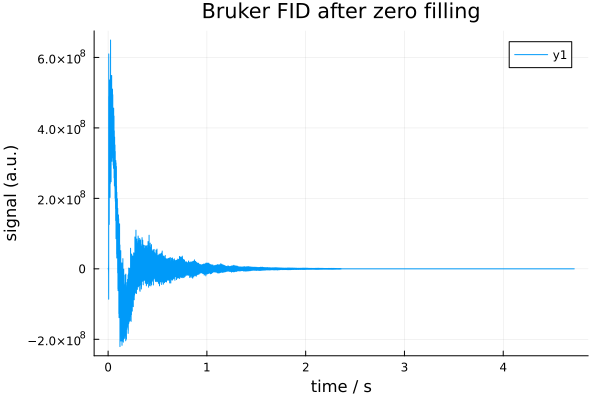
4.4 Apodization (Apodize)
Apodization applies a decay function (window) to the time-domain FID. In practice, this damps the tail of the FID, reducing truncation artefacts and high frequency noise in the frequency domain at the cost of some line broadening. It is typically applied after zero filling and before the Fourier transform.
In NMRflux.jl, apodization is implemented by the processor Apodize, which acts on SpectData by multiplies the data along selected dimensions by an exponential factor of the form:
f(t) = exp.(-R * t)where:
- The
tis the coordinate axis of the processed dimension (usually time) - The
Ris the user specified decay constant for that dimension
Internally, Apodize uses the coordinate vector of each selected dimension to compute this exponential weighting and multiplies it into the underlying data array. The coordinate vectors are preserved. For time domain FIDs, R therefore has units of 1/seconds. Continuing from the previous section, we apply apodization to the zero filled FID data_td_bruker_zf:
ap = Apodize([0.5]) # Decay constant for the first (time) dimension
data_td_bruker_zf_ap = ap(data_td_bruker_zf)

size(data_td_bruker_zf_ap.dat), data_td_bruker_zf_ap.coord[1][1:5]
((65536,), 0.0:7.199999999999995e-5:0.0002879999999999998)This produces a windowed time domain signal suitable for Fourier transformation.
# Extract time axis and real part AFTER apodization
t_ap = data_td_bruker_zf_ap.coord[1]
y_ap = real.(data_td_bruker_zf_ap.dat)

plot(t_ap, y_ap; xlabel="time / s", ylabel="signal (a.u.)", title="Bruker FID after ZF + AP")
savefig("bruker_fid_zf_ap_plot.svg"); nothing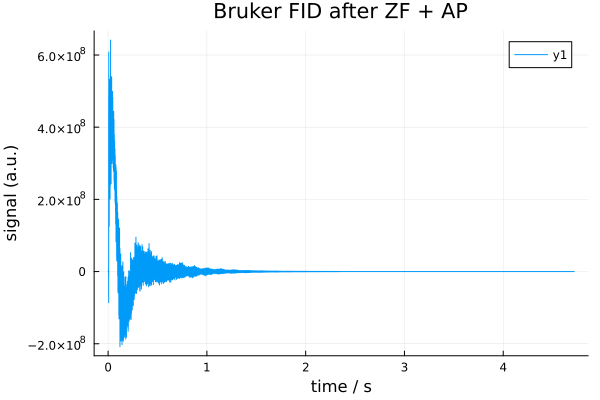
4.5 Fourier transform (FourierTransform)
The Fourier transform converts a time domain FID into a frequency domain spectrum. After zero filling and apodization, applying the FFT produces a complex spectrum whose real and imaginary parts can be used for further processing (phase correction, baseline correction, peak picking, etc.).
In NMRflux.jl, the processor FourierTransform wraps FFTW's FFT planning and updates the coordinate axes accordingly. For each transformed dimension:
- The FFT is applied to the data
- The coordinate axis is replaced by a frequency axis based on the sampling interval (Nyquist theorem)
- By default, the spectrum is shifted so that zero frequency appears at the centre (fftshift = true). This behaviour can be disabled by setting fftshift = false.
The FourierTransform constructor is declared as:
function FourierTransform(SI::Vector, dims::Vector; fftshift = true)
dummy = zeros(ComplexF64, SI...)
plan = FFTW.plan_fft(dummy, dims)
return FourierTransform(dims, SI, fftshift, plan)
endSI: size of the data array (e.g. [N] for 1D, [N1, N2] for 2D)dims: dimensions along which the FFT is computed (e.g. [1], [1, 2])fftshift: whether to apply FFTW.fftshift so that zero frequency is in the centre of the axis
Example: Continuing from Section 4.4, we start from the apodized, zero filled FID data_td_bruker_zf_ap:
SI = [length(data_td_bruker_zf_ap.dat)]         # Size of the apodized time domain data (1D)
ft = FourierTransform(SI, [1]; fftshift = true) # Construct a FourierTransform along the first dimension, with fftshift

data_fd_bruker_zf_ap = ft(data_td_bruker_zf_ap) # Apply FT to the apodized zero filled SpectData
size(data_fd_bruker_zf_ap.dat)(65536,)f_ap = data_fd_bruker_zf_ap.coord[1] # frequency axis (Hz)
y_ap = real.(data_fd_bruker_zf_ap.dat) # real spectrum
plot(f_ap, y_ap, xaxis=:flip,
xlabel = "frequency [Hz]",
ylabel = "signal (a.u.)",
title = "Bruker spectrum (ZF + AP + FT)")
savefig("bruker_fd_zf_ap_plot.svg"); nothing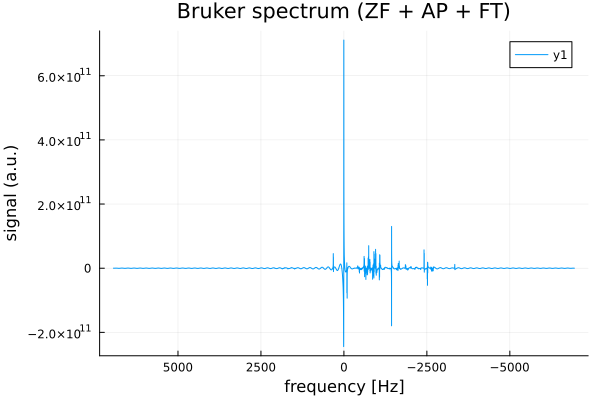
4.6 Phase correction (PhaseCorrect)
After Fourier transformation, NMR spectra generally require phase correction to produce pure absorption mode lineshapes in the real part of the spectrum. The PhaseCorrect applies a zero order and first order phase correction along a chosen dimension.
ph0: zero order phase (radians), a uniform rotation applied to all pointsph1: first order phase (radians per axis unit), a linear phase rampdim: the dimension along which the correction is applied (typically 1 for 1D spectra)
The correction applied is:
c(t)=eiph0⋅eiph1twhere t is the coordinate axis of the spectrum (in Hz for frequency domain data).
Example: phase correction of the Bruker spectrum
Continuing from the previous section, we start from the frequency domain, zero filled, apodized spectrum data_fd_bruker_zf_ap:
ph0 = 0.0  # zero-order phase (radians)
ph1 = 0.0  # first-order phase (radians)
dim = 1    # apply along the first (frequency) dimension

pc = PhaseCorrect(ph0, ph1, dim)
data_fd_bruker_zf_ap_pc = pc(data_fd_bruker_zf_ap)

size(data_fd_bruker_zf_ap_pc.dat), data_fd_bruker_zf_ap_pc.coord[1][1:5]
((65536,), -6944.44444444445:0.21193085967633934:-6943.596721005744)f_pc = data_fd_bruker_zf_ap_pc.coord[1] # frequency axis (Hz)
y_pc = real.(data_fd_bruker_zf_ap_pc.dat) # real part after phase correction
plot(f_pc, y_pc, xaxis=:flip,
xlabel = "frequency [Hz]",
ylabel = "signal (a.u.)",
title = "Bruker spectrum (ZF + AP + FT + PC)")
savefig("bruker_fd_zf_ap_pc_plot.svg"); nothing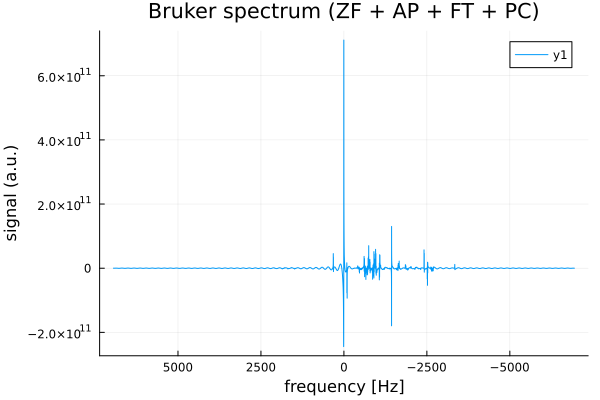
In practice, ph0 and ph1 would be adjusted (e.g. interactively or by an automatic optimizer) until the peaks in the real part of data_fd_jeol_zf_ap_pc are symmetric and purely absorptive. Via the generic NMRProcessor1D machinery, PhaseCorrect can also be applied slice wise along a chosen dimension of higher dimensional SpectData objects.
4.7 Baseline correction (MedianBaselineCorrect)
After phase correction, spectra often exhibit slowly varying offsets or slopes in the real part, known as baseline distortions. These can bias peak integration and make peak picking less reliable. Baseline correction should be applied after phase correction, so that the real part contains the absorptive peaks. The MedianBaselineCorrect implements a robust baseline correction for the real part of a spectrum. The algorithm follows the method of M. S. Friedrichs (Journal of Biomolecular NMR, 5 (1995) 147-153) and proceeds as follows along a chosen dimension:
- For each position along the axis, a local window of width
2 * wdw + 1points is considered - Within this window, local extrema (minima and maxima) of the real part are extracted
- The median of these extrema is taken as a robust estimate of the local baseline
- The sequence of baseline estimates is then smoothed by convolution with a Gaussian like kernel
- The resulting smooth baseline is subtracted from the original complex data (affecting primarily the real part)
The processor is constructed as:
NMRflux.MedianBaselineCorrect(dim; wdw = 256)where:
dim: dimension along which baseline correction is performed (typically 1 for 1D spectra)wdw: half width of the local window in points (controls the "smoothness" scale of the baseline)
Example: Continuing from the previous section, we start from the phased frequency domain spectrum data_fd_bruker_zf_ap_pc:
mbc = NMRflux.MedianBaselineCorrect(1; wdw = 256)   # baseline correction along frequency dimension
data_fd_bruker_zf_ap_pc_bc = mbc(data_fd_bruker_zf_ap_pc)

size(data_fd_bruker_zf_ap_pc_bc.dat), data_fd_bruker_zf_ap_pc_bc.coord[1][1:5]
((65536,), -6944.44444444445:0.21193085967633934:-6943.596721005744)f_bc = data_fd_bruker_zf_ap_pc_bc.coord[1] # frequency axis (Hz)
y_bc = real.(data_fd_bruker_zf_ap_pc_bc.dat) # real part after baseline correction
plot(f_bc, y_bc, xaxis=:flip,
xlabel = "frequency [Hz]",
ylabel = "signal (a.u.)",
title = "Bruker spectrum (ZF + AP + FT + PC + BC)")
savefig("bruker_fd_zf_ap_pc_bc_plot.svg"); nothing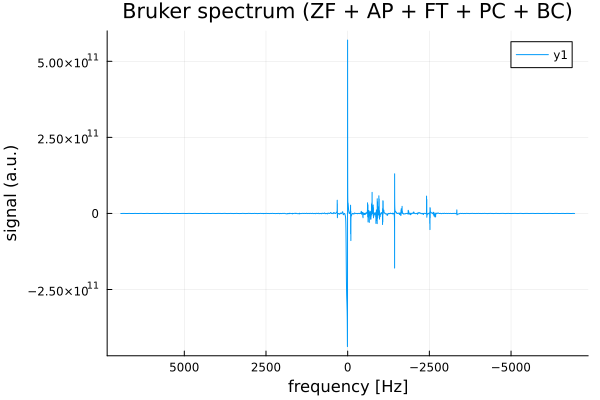
Here:
dim = 1selects the first dimension (the frequency axis) for baseline correctionwdw = 256sets the half width of the local window; larger values produce a smoother, more slowly varying baseline estimate
The output data_fd_jeol_zf_ap_pc_bc is a SpectData object with the same coordinates as the input but with the baseline of the real part largely removed, providing a cleaner spectrum for peak picking and integration.
4.8 A typical 1D processing pipeline
In practice, the processing steps described above are often combined into a single pipeline that transforms a raw time domain FID into a clean, baseline corrected spectrum ready for peak picking and integration.
For 1D data, a typical sequence is:
- Zero filling
- Apodization
- Fourier transform
- Phase correction
- Baseline correction
The NMRflux.jl allows these processors to be combined using Chain, which applies them in sequence.
# (1) Loading Bruker data
params_bruker, data_td_bruker = NMRflux.load(joinpath(data_bruker["path"], "10"), :Bruker)

# (1) Zero filling
N_orig   = length(data_td_bruker.dat)            # Original number of points
N_target = 2^16                                  # Target size: 64k points
N_new    = max(N_orig, N_target)                 # Never shrink: only zero fill if N_orig < N_target
zf = ZeroFill([N_new])

# (2) Apodization (time-domain exponential)
ap = Apodize([0.5])                              # Decay constant for the first (time) dimension

# (3) Fourier transform (1D, with fftshift)
SI = [N_new]                                     # Size of the apodized time domain data (1D)
ft = FourierTransform(SI, [1]; fftshift = true)  # FT along dim 1, with fftshift

# (4) Phase correction (example values)
ph0 = 0.0                                        # zero order phase (radians)
ph1 = 0.0                                        # first order phase (radians per Hz)
freq_dim = 1                                     # frequency axis is dimension 1
pc = PhaseCorrect(ph0, ph1, freq_dim)

# (5) Baseline correction on the frequency dimension
mbc = NMRflux.MedianBaselineCorrect(1; wdw = 256) # window half width = 256 points

# Build the processing chain: ZeroFill -> Apodize -> FT -> Phase -> Baseline
p = Chain(zf, ap, ft, pc, mbc)

bruker_data_processed = p(data_td_bruker)        # Run the processing chain

size(bruker_data_processed.dat), bruker_data_processed.coord[1][1:5]
((65536,), -6944.44444444445:0.21193085967633934:-6943.596721005744)f_proc = bruker_data_processed.coord[1] # frequency axis (Hz)
y_proc = real.(bruker_data_processed.dat) # real part of processed spectrum
plot(f_proc, y_proc, xaxis=:flip,
xlabel = "frequency [Hz]",
ylabel = "signal (a.u.)",
title = "Bruker spectrum (ZF + AP + FT + PC + BC)")
savefig("bruker_full_pipeline_plot.svg"); nothing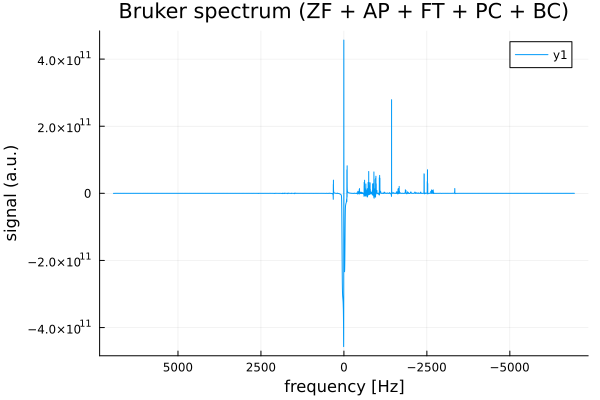
5. Spin Dynamics Simulation and Synthetic FIDs (GenerateFIDs / SpinSim)
NMRflux.jl includes a lightweight spin dynamics engine (SpinSim) for simulating NMR spin evolution. SpinSim is designed for generic spin dynamics simulations in both the time and frequency domain, performing simulations in Hilbert space using the density operator formalism. Building on this physics core, NMRflux.jl provides a higher level helper module (GenerateFIDs) for generating realistic synthetic 1H NMR spectra and time domain FIDs that resemble experimental measurements of complex mixtures motivated by our group's main interest in analysing complex mixtures in biological contexts (metabolomics and metabolic analysis). Because the full pipeline is implemented in Julia and can generate paired clean/dirty data on demand, it provides an effectively unlimited source of training data for machine learning models, and it is also useful for stress testing and validating NMR processing pipelines.
The main entry point is generateBatch, which offers a unified, user friendly interface for producing synthetic datasets. It reads all simulation parameters from a TOML configuration file, automatically generates random spin Hamiltonians, computes the corresponding frequency domain spectra, converts them into realistic time domain FIDs, and applies artefacts (e.g. noise, phase errors, solvent peaks, and baseline distortions) to produce dirty FIDs. The output is returned as a SpectData object, fully compatible with downstream processing tools in NMRflux.jl, and can be written to disk in .jld2 format.
Each batch follows a clean/dirty pairing convention: odd-indexed rows contain clean FIDs and the subsequent even-indexed rows contain the corresponding artefact-corrupted dirty FIDs (row 1 = clean, row 2 = dirty; row 3 = clean, row 4 = dirty; etc.). All simulation behaviour is controlled entirely through the TOML configuration file, ensuring reproducibility and easy tuning of SNR and artefact settings.
5.1 TOML configuration for synthetic FIDs
A typical configuration file has four sections: [Hamiltonian], [FID], [Artefacts], and [Batch]. For example:
[Hamiltonian]
nCouplings = 2            # average number of couplings per spin
shiftRange = [0.0,10.0]   # range of chemical shifts (ppm-like units)
Jstd = 12.0               # J-coupling std. dev. (Hz)
baseFreq = 700.0          # base frequency in MHz
shiftCtr = 4.76           # centre offset for shifts

[FID]
SWH = 5000                # spectral width in Hz
TD = 1024                 # number of complex points
LWmean = 2.0              # mean linewidth in Hz
LWstd = 5.0               # linewidth std. dev. in Hz

[Artefacts]
phase0error = 360.0       # max zero-order phase error (deg)
phase1error = 360.0       # max first-order phase error (deg over full width)
solventArtefact = 100.0   # solvent artefact intensity
solventWidth = 100.0      # solvent artefact width (Hz)
baselineArtefact = 10.0   # baseline distortion strength
baselineDuration = 0.0002 # baseline distortion duration (s)
SNR = 500.0               # signal/noise ratio

[Batch]
size = 250                # number of (clean, artefact) pairs
nFIDs = 3                 # number of basis FIDs to generate
alpha = 3                 # width of exponential concentration distribution
filename = "Batch16k"     # output filename prefix (without extension)
maxNspin = 4              # maximum number of spins in any system
Conceptually:
[Hamiltonian]: controls the random spin systems (chemical shifts, J couplings, base frequency)[FID]: sets digitization parameters (spectral width SWH, number of points TD, linewidth statistics)[Artefacts]: controls phase errors, solvent peaks, baseline distortions, and noise level[Batch]: sets the number of samples and file output behaviour
5.2 Generating a batch of synthetic FIDs
The main entry point is GenerateFIDs.generateBatch, which reads the TOML file, builds the Hamiltonians, simulates the spectra using SpinSim.Spectrum, converts them to time domain FIDs, applies artefacts, and returns a SpectData object.
using NMRflux
using NMRflux.GenerateFIDs

toml_file = joinpath(@DIR, "..", "examples", "synthetic", "Batch16k.toml") # Path to your TOML configuration file (adjust to your repository layout)
batch = GenerateFIDs.generateBatch(toml_file; saveFile = false)
The return value batch is a 2D SpectData object:
batch.dathas size (2 * nbatch, TD)- Rows
1, 3, 5, ...contain the clean FIDs - Rows
2, 4, 6, ...contain the corresponding artefact-distorted FIDs
- Rows
batch.coord[1]is the row index (1, 2, 3, ...)batch.coord[2]is the time axis (seconds)
6. Deep Learning Spectral Denoiser
NMRflux.jl includes Flux based deep learning tools for applying deep learning to the denoising of NMR spectra. These tools integrate with the SpectData structures of NMRflux and provide a flexible interface for loading datasets, building denoising models, training them, and applying inference to new FIDs or spectra.
6.1 Overview
Many NMR experiments, especially at low concentration or short acquisition times, produce spectra with poor signal-to-noise ratio and various artefacts (baseline distortions, phase errors, solvent residuals, etc.). Classical processing (apodisation, Fourier transform, phase and baseline correction, filtering) can improve the data, but often requires hand tuning and may either oversmooth peaks or leave structured noise. The deep learning spectral denoiser in NMRflux.jl addresses this problem by learning a non linear mapping from artefact corrupted spectra to their corresponding clean spectra. It uses a deep 1D convolutional autoencoder with residual connections, trained on pairs of clean/dirty spectra, to suppress noise and artefacts while preserving peak positions and line shapes. Once trained, the model can be applied to new spectra as an automated denoising step in larger NMR processing or analysis pipelines.
6.2 Data representation
The denoiser operates on frequency-domain spectra stored as SpectData objects and saved in .jld2 files. Each SpectData used for training or validation is a 2D complex array where odd-numbered rows contain clean spectra and the corresponding even-numbered rows contain the matching noisy/artefact corrupted spectra. Internally, the training script normalizes each clean/dirty pair and converts them into WHCN tensors: the input to the model is the dirty spectrum with two channels (real and imaginary parts), and the target is the corresponding clean spectrum represented by a single channel (real part only). The model therefore learns to map (W, 2, N) dirty spectra to (W, 1, N) cleaned real spectra, where W is the number of frequency points and N is the batch size.
Training is controlled via a simple TOML configuration file (learning rate, batch size, number of epochs, etc.), and the script automatically writes model checkpoints (.bson files) during training so that runs can be resumed or warm started later.
Dataset Format and Loaders
The training script expects a single .jld2 file that contains one training split and one or more validation splits. Internally, the helper function
load_multi_snr_loaders(path; batchsize=50, norm_mode=:max, seed=1234, send_to_gpu=true)Required keys in the .jld2 file
The dataset file must contain:
- A training split stored under the key "train"
- zero or more validation splits stored under keys of the form "valsnr10", "valsnr20", ...
The suffix (e.g. 10, 20) can be any SNR label you like; the loader sorts these by SNR and reports validation losses per split.
Each value at these keys must be a SpectData object.
Shape and type of each SpectData
For each split (train, valsnrXXX):
sdis aSpectDatasd.datis a 2D array of typeComplexF32with shape (2 * nbatch, W)2 * nbatchrows,Wfrequency points per spectrum- The row axis encodes clean/dirty pairs:
- row 1 : clean spectrum 1
- row 2 : dirty spectrum 1
- row 3 : clean spectrum 2
- row 4 : dirty spectrum 2
- etc
length(sd.coord) == 2sd.coord[1]is a row index axis (e.g.1:2*nbatch)sd.coord[2]is the frequency axis (in Hz, ppm, or arbitrary units)
The loader enforces:
.jld2extension onlySpectDatawith complex element typeComplexF32- 2D layout (rows x axis)
- even number of rows (clean/dirty pairing)
6.3 TOML Configuration for Training
Training is configured via a [Trainer] table in a TOML file. A typical example is:
[Trainer]
batchSize      = 10
epochs         = 100000
timestamps     = 10
eta            = 2.0e-3
etaDecay       = 0.05
weightDecay    = 0.0e0
beta1          = 0.9
beta2          = 0.999
fname          = "Training"
breakCriterion = -0.1
The script reads this TOML file, constructs a Trainer object, and uses it to control batch size, number of epochs, logging behaviour, and the optimiser (AdamW with eta, beta1, beta2, and weightDecay). The timestamps parameter controls how often detailed metrics are logged and checkpoints are written.
6.4 Running the training script & checkpoints
The training script is invoked from the command line:
julia spec_cleaner_train.jl <dataset_path.jld2> [config_path] [--restart path | --init path]dataset_path.jld2: Path to a.jld2file containing aSpectDataobject named "train" and one or more validation splits named "valsnrXXX"config_path(optional): Path to theTOMLconfiguration. If omitted, a default fileTrainer_repro.tomlis used--restart path: Resume a previous run from a full checkpoint (.bson) that stores both the model weights and optimiser / tracking state--init path: Warm start from an existing model checkpoint, but reset the optimiser and training history (useful when fine tuning on a new dataset)
During training, the script writes:
model_last.bson: The most recent model state (updated regularly)model_best.bson: The model with the best overall validation loss so farmodel_E-k_...bson: Additional checkpoints saved whenever the validation loss has improved by an order of magnitude relative to the previous baseline (E-1, E-2, etc.)
All training progress (loss curves, per-SNR validation metrics, and messages about checkpoints) is logged to a timestamped log file whose name starts with fname from the TOML configuration (e.g. Training-2025-11-17_10-35-22.log).
Typical example:
julia spec_cleaner_train.jl spec_dataset.jld2 Trainer.tomlTo run training in the background on a server:
nohup julia spec_cleaner_train.jl spec_dataset.jld2 Trainer.toml > out.log 2>&1 &6.5 Inference and Plotting
After training, the spec_cleaner_inference.jl script applies a saved model to new datasets and optionally produces plots. It supports two modes:
- Simulated datasets: clean + dirty rows (paired)
- Experimental datasets: dirty only rows (no ground truth)
6.5.1 Simulated datasets (paired clean/dirty)
Input format (simulated): rows are interleaved
[clean1, dirty1, clean2, dirty2, ...]Inference and plotting:
# Run inference on a simulated dataset
julia spec_cleaner_inference.jl infer-simulated <model_checkpoint.bson> <dataset.jld2>

# Plot a single example from the result file (clean, cleaned, dirty)
julia spec_cleaner_inference.jl plot-simulated <result_file.jld2> <index> [ppm_config.toml]

# Plot all pairs to a directory
julia spec_cleaner_inference.jl plot-simulated-all <result_file.jld2> [outdir] [ppm_config.toml]- The inference step writes a new
.jld2file where spectra are stored in triplets as[clean, cleaned, dirty]repeated for each pair - The plotting commands overlay clean, cleaned, and dirty spectra (in ppm if a
ppm_config.tomlis provided, otherwise in bin/frequency index)
6.5.2 Optional PPM configuration
The plotting functions (plot-simulated, plot-simulated-all, plot-experimental, etc.) can display spectra on a ppm axis if a small TOML configuration file is provided. This configuration defines the Larmor frequency and spectral width needed to convert FFT bin indices into ppm.
A typical ppm_config.toml file looks like:
# ppm_config_simulated.toml

[Hamiltonian]
baseFreq = 700.0         # MHz (e.g. 1H at 16.4 T)
shiftCtr = 4.76          # ppm (reference peak, e.g. water or TMS)

[FID]
SWH = 10000.0            # Hz spectral width
Fields:
baseFreq: The transmitter frequency in MHz (e.g. 600, 700, 900 ...). This sets the overall ppm scaleshiftCtr: Reference position in ppm
Examples:
- 4.76 for water at high field
- 0.00 for TMS
- 2.01 for NAA in MRS, etc
SWH: Spectral width (in Hz) used to compute the frequency axis before ppm conversion
If no ppm config is supplied, plots fall back to a bin index axis, which is still useful but not physically calibrated.
6.6 Key Features
Configurable synthetic data generation: Users can generate arbitrarily large synthetic datasets using
GenerateFIDs, with full control over noise level, SNR, phase errors, baseline distortions, solvent artefacts, and linewidths. This enables "infinite" training data tailored to the characteristics of any experimental setup.Learned clean-dirty mapping: The training pipeline automatically extracts paired clean/dirty spectra from
.jld2datasets and normalises each pair using a norm derived from the dirty spectrum (default::maxamplitude). This ensures that training is numerically stable and reproducible.Multi-SNR evaluation: The loader automatically detects validation splits named
val_snr_XXX, sorts them by SNR, and reports validation losses per SNR level as well as an overall average. This provides detailed insight into model robustness across noise conditions.GPU acceleration and reproducibility: All tensors and model weights are moved to the GPU (
gpu(...)) for fast training. The script sets a global random seed for both Julia's RNG and CUDA (GLOBAL_SEED) to ensure fully reproducible training runs.
6.7 Building train/validation sets from synthetic FIDs (convenience script)
For user convenience, NMRflux.jl provides a script make_train_val_multi_snr_from_synthetic_dir.jl that scans a directory of synthetic FID batches (from GenerateFIDs) and builds one unified training file with:
- A single mixed SNR training set
- Separate validation sets for each SNR value
It expects .jld2 files whose names look like FIDs_16384_SNR-1000_0001.jld2 and that each file contains a SpectData under the key "batch" with rows ordered as [clean1, dirty1, clean2, dirty2, ...].
Given such a directory, the script:
- Loads all FID batches from input_dir
- Zero fills, apodizes, and Fourier transforms them to
Spec64k - Crops each spectrum into 4k tiles with 50% overlap (preserving clean/dirty pairing)
- Groups all crops by SNR (parsed from the filenames)
For each SNR:
- Concatenates all crops for that SNR
- Splits by clean/dirty pair into train/val (default 80% / 20%, no shuffle)
Builds one combined dataset with:
"train"::SpectData{ComplexF32,2}: all SNRs mixed together"val_snr_XXX"::SpectData{ComplexF32,2}: one validation set per SNR"meta"::Dict{String,Any}: parameters, counts, per SNR information
This format matches the expectations of the deep learning loader load_multi_snr_loaders and is meant to be the main entry point for training.
Basic usage:
julia make_train_val_multi_snr_from_synthetic_dir.jl ../examples/synthetic/This will:
- Scan synthetic for
FIDs_*SNR*.jld2 - Process all of them with default settings
Write a single file such as TrainVal_multiSNR_crops4096_h2048.jld2 back into the same directory.
You can then point the training script directly to this file as:
julia spec_cleaner_train.jl TrainVal_multiSNR_crops4096_h2048.jld2Custom output and parameters. All arguments except input_dir are optional:
julia make_train_val_multi_snr_from_synthetic_dir.jl <input_dir> [output_dir] [zf_pow2] [apod] [cropN] [hop] [frac_train]input_dir: directory with FID.jld2files (each with "batch" ::SpectData)output_dir: directory for the combined train/val file (default:input_dir)zf_pow2: zero fill length as power of two (default: 16 -> 65536 points)apod: exponential apodization constant in time domain (default: 0.5pi)cropN: crop length in points (default: 4096)hop: hop length between crops (default: cropN/2 -> 50% overlap)frac_train: fraction of clean/dirty pairs used for training in each SNR group (default: 0.8)
Example with custom settings:
# No overlap and 75% of pairs used for training
julia make_train_val_multi_snr_from_synthetic_dir.jl ../examples/synthetic/ ../out_multi 16 1.57 4096 4096 0.75
The resulting TrainVal_multiSNR_*.jld2 file is ready to be used with load_multi_snr_loaders, which will create a shuffled "train" loader with mixed SNRs and non shuffled "valsnrXXX" loaders for each SNR, for monitoring validation loss by noise level.
6.8 Building test only sets from synthetic FIDs (convenience script)
For user convenience, NMRflux.jl also provides a standalone script make_test_from_synthetic_dir.jl that builds test only datasets from synthetic FIDs generated by GenerateFIDs. Given an input directory of .jld2 files with names starting with FIDs_ and having SpectData stored under the key "batch" and rows ordered as [clean1, dirty1, clean2, dirty2, ...] and SNR encoded in the filename (e.g. FIDs_16384_SNR-1000_0001.jld2), the script:
- Loads all FID batches in the directory
- Zero fills, apodizes, and Fourier transforms them
- Crops each spectrum into 4k tiles with 50% overlap (preserving clean/dirty pairing)
- Groups all crops by SNR (parsed from the filenames)
- Concatenates all crops per SNR without any train/val splitting
- Writes one JLD2 file per SNR with:
- "test" ::
SpectData{ComplexF32,2} - "batch" ::
SpectData{ComplexF32,2}(alias so inference scripts expecting "batch" work directly) - "meta" ::
Dict{String,Any}with parameters, counts, and input file list
- "test" ::
This is intended for final evaluation or for stress testing a trained model on large synthetic test sets.
Basic usage
julia make_test_from_synthetic_dir.jl ../examples/synthetic/Custom output and parameters. All arguments except input_dir are optional:
julia make_test_from_synthetic_dir.jl <input_dir> [output_dir] [zf_pow2] [apod] [cropN] [hop]input_dir: directory with synthetic FID .jld2 files (each with "batch" :: SpectData)output_dir: directory for the test files (default: input_dir)zf_pow2: zero-fill length as power of two (default: 16 -> 65536 points)apod: exponential apodization constant in time domain (default: 0.5pi)cropN: crop length in points (default: 4096)hop: hop length between crops (default: cropN/2 -> 50% overlap)
Example with custom settings:
# No overlap and custom apodization
julia make_test_from_synthetic_dir.jl ./synthetic_FIDs_test ./out_test 16 1.57 4096 4096
The resulting Test_SNR-XXX_*.jld2 files can be used directly with the inference script for evaluating a trained denoiser across different SNR levels.